
How To · Technoogies · Web Dev
Microsoft DNS Can’t Use @ for CNAME Record
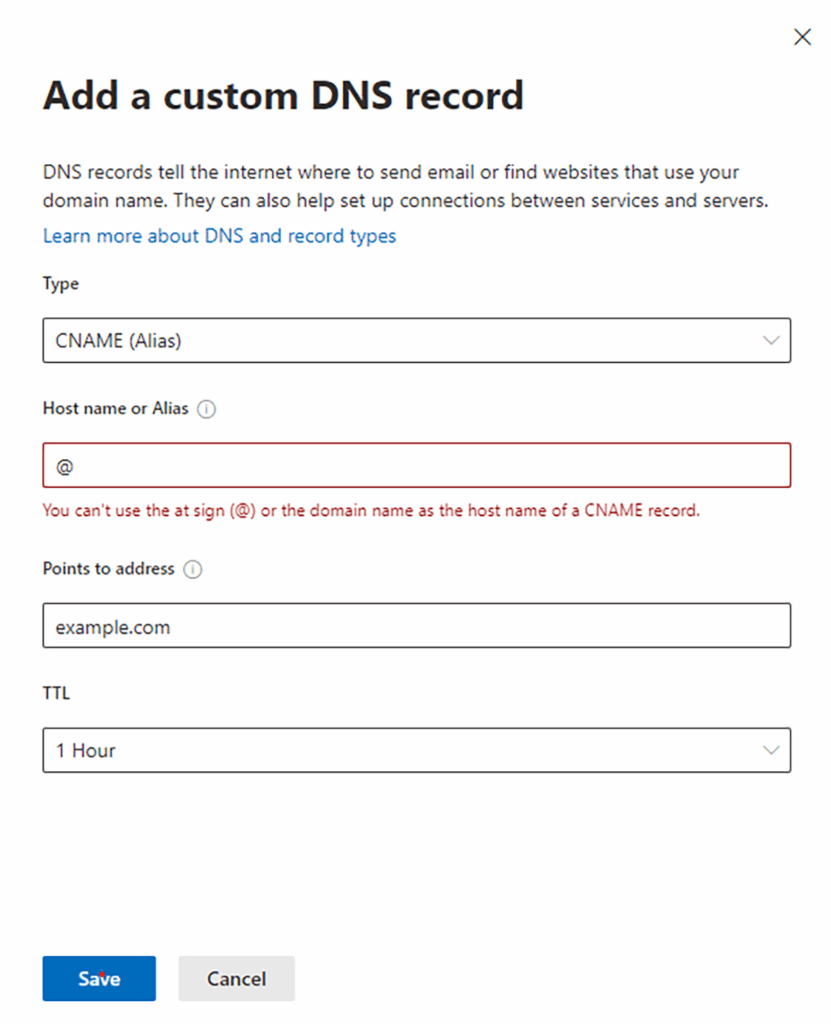
CNAME (Alias) @ Issue
The Error
“You can’t use the at sign (@) or the domain name as the host name of a CNAME record.”
What if your web host needs a special CNAME record for certain types of requests to work correctly and your using Microsoft Office365 DNS so that your SVR records work properly? Some DNS services can’t make a proper SVR record for your Skype to function the way it needs to. So you decide to use Microsoft for your DNS to resolve your Email on Exchange, Mobile Device Security, Skype, and your Website, But you need a CNAME with a wild card which typically uses @.
The Workaround
Years ago, in the world of DNS Bind, the wild card wasn’t an @ (AT); it was an asterisk or what some call a star. The character you make while pressing the shift key with the number 8.
Use this instead * and it will work. A little old school know how.

Leave a Reply