
Operating Systems · Software
Outlook is not responding. Please try starting up Outlook and try again.
Guidance on Intuit QuickBooks support doc 186062
Error: QuickBooks is unable to send your email to Outlook
Solution 3: Ensure that your email preference is set correctly in Internet Explorer
Even though Intuit updated this only three days ago at the time of this post, this solution doesn’t apply to Windows 10. This is the easiest one to implement and should probably be first for that reason alone but also because it’s the most common culprit for QuickBooks not being able to email through Outlook.
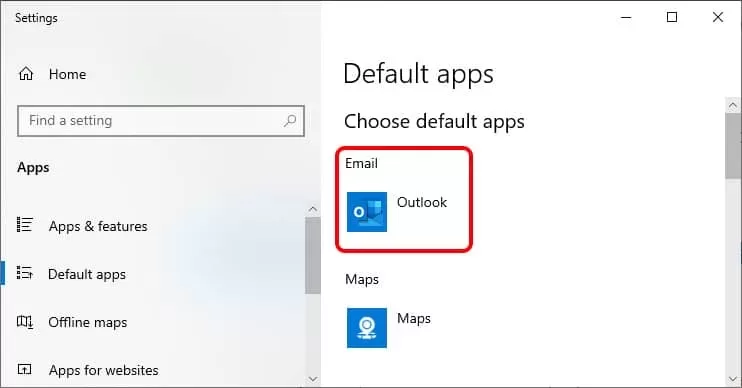
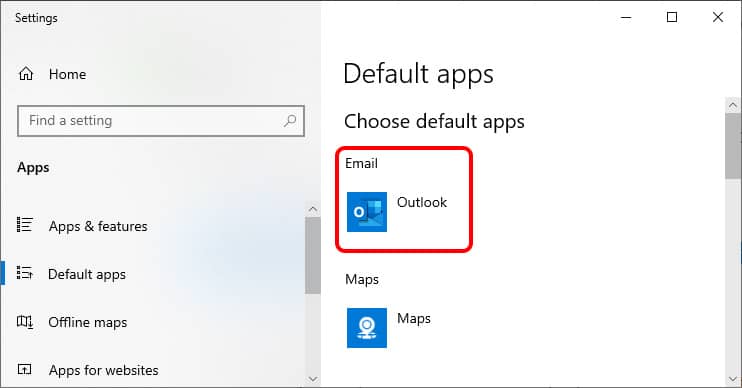
In the Windows search bar type “Default Apps”. Select and run this system application. On the top is email. Select Outlook for the default email app, close this app, save your work files and close your programs, then reboot your system.
I recommend opening Outlook first and to wait until its responsive. Then open QuickBooks and before you try to email anything, wait until that record is completely loaded.
Default mail client is no longer a part of Internet Explorer.
- Cory L. Curtis
- 2019-09-10


Leave a Reply